Special key sequence to run cmd at Windows lock screen
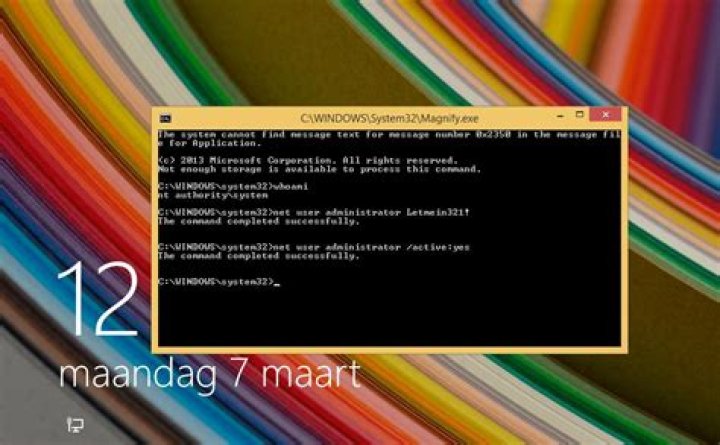
I'm aware of the hack where you can copy cmd.exe to the program that launches the sticky keys GUI, thereby giving you command line admin access from the Windows lock screen after pressing Shift five times.
I'm curious if there's a similar way to add a different key sequence to launch cmd.exe from the Windows lock screen using a different key sequence. This would allow an easier and quicker method of resetting a user's password, remoting into another machine, changing a text file without having to log in, etc.
3 Answers
You can use an Ubuntu Live CD to make the Ease of Access Center shortcut (Win+U) open CMD instead. Under /Windows/System32, rename Utilman.exe to something else and rename/copy+rename CMD.exe to Utilman.exe.
This will let you open CMD by pressing Win+U, and it will work everywhere.
You can change any .exe (narrator, sticky keys, magnifier)that is avaiable from a locked windows box.
I'll show you how to change the magnify.exe
You can change the magnify.exe hotkey (Winkey and +) so it will use cmd.exe with the built-in system account.
You can do this with a Windows setup Media. Just download the appropriate
ISOfile, insert and reboot.When rebooting, press a key to access the installation.
Choose to repair the computer, and press `Shift+F10' to open a command prompt.
Look for the drive where Windows is installed on, by pressing
C:,D:etc.When the drive is found, browse to the System32 directory by typing
cd windows\system32First make a back-up of the
magnify.exein theC:\Windowsdirectory, by typingcopy magnify.exe ..Now overwrite
cmd.exewithmagnify.exewith the following commandCopy cmd.exe magnify.exeFinally reboot the machine. and press the hotkey
WindowsKeyand+at the locked Windows screen to launchcmd.exeas thesystemaccount. (ability to enable/disable admin account, create new admin accounts etc.)
To revert the
Magnify.exehotkey, run the following command from an elevated command prompt.Robocopy C:\Windows C:\Windows\System32 magnify.exe /BNow when locking again, and hitting the hotkey, you get the good old magnifier tool again:
Locked means are you referring to that you have forgotten your password? If so, restart the machine and press the F8 key continuously until you get a black screen with some options like:
- Start Windows in safe mode.
- Start Windows in safe mode with command prompt.
- Start Windows with networking.
- Start Windows normally.


